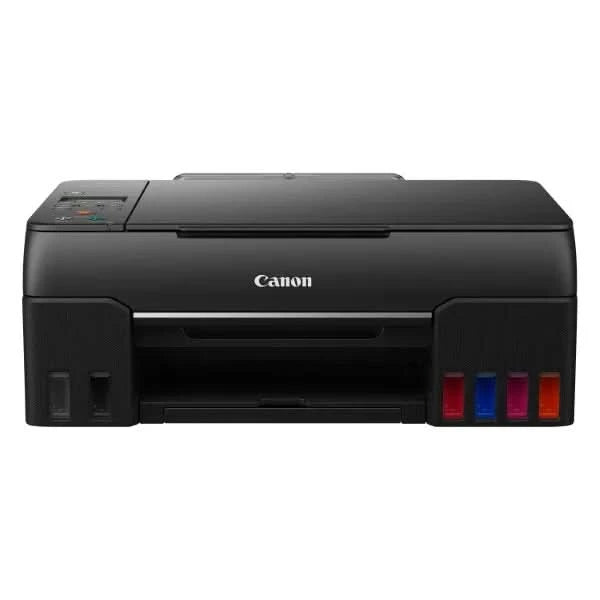
Printer type: Inktank ; Functions: Print, Scan, Copy ; Printer output: Colour ; Connectivity: Wifi, USB ; Scanner: Yes ; Scanner resolution: 600 x1200 dpi
OS Compatibility: Windows 10 / 8.1 / 7 SP1 (operation can only be guaranteed on a PC with a pre-installed Windows 7 or later) macOS 10.12.6 ~ 11, Chrome OS; Mobile connectivity : Yes (via Canon Print Service, PIXMA Cloud Link,Easy Photo-Print Editor,Canon PRINT Inkjet/SELPHY) ; Hardware Interface: USB 2.0, Enlarge/reduce option: No ; Duplex:No
Maximum Print Speed (color): 3.9 ipm , Maximum Print Speed (Monochrome): 3.9 ipm: Print cost Monochrome (A4): Rs 0.25, Print cost color(A4): Rs 0.54 , Print cost color(4×6 inch): Rs 1.48; Maximum Print Resolution(Color): 4800×1200 dpi, Maximum Print Resolution(Monochrome): 4800×1200 dpi
Page size : A4, A5, B5, A6, LTR, LGL, Executive, Legal (India), Foolscap, B-Oficio, M-Oficio, 10.16×15.24cm (4 x 6in), 12.7×17.28cm (5 x 7in), 17.78×25.4cm (7 x 10in), 20.32×25.4cm (8 x 10in), Envelopes (DL, COM10, C5, Monarch), Square (8.89×8.89cm (3.5 x 3.5in), 12.7×12.7cm (5 x 5in)), Card Size (91 x 55mm); Max paper thickness (in GSM): 64 to 275 GSM ; Maximum Input Sheet Capacity: 100 sheets (A4) ; Compatible ink:GI- 73 Cyan, Magenta, Yellow, Red, Grey, Black; Additional Printer Function: Photo print quality; Power wattage of printer: OFF: Approx 0.2 W, Standby (scanning lamp is off) USB connection to PC: Approx. 0.6W, Copying USB connection to PC: Approx. 16W
Special Features: High quality photo printer; Ideal Usage : Home, Photo lab and Photo Studio ; Included Components: Printer, Power Cord, USB cable, Instruction Manual, 1 set of GI 73 Cyan, Magenta, Yellow, Red, Grey and Black ink bottles
Warranty – 1 year warranty from the date of purchase.Use only genuine Canon ink. Using counterfeit ink will harm your printer as well as render your warranty void
Print Head / Ink
Number of Nozzles
Total 2 304 nozzles
Ink Bottles
GI-73 (Black / Grey / Cyan / Magenta / Yellow / Red) MC-G02 (Maintenance cartridge)
Maximum Printing Resolution
4 800 (horizontal)*1 x 1 200 (vertical) dpi
Print Speed*2 Based on ISO/IEC 24734 Click here for summary report Click here for Document Print and Copy Speed Measurement Conditions
Document (ESAT/Simplex)
Approx. 3.9 images per minute (black) / (colour)
Document (FPOT Ready / Simplex)
Approx. 20.0s (black) / (colour)
Photo (10.16x15.24cm (4 x 6in)) (PP-201/Borderless)
Approx. 47s
Printable Width
Up to 203.2 mm (8in) Borderless: Up to 216 mm (8.5in)
Printable Area
Borderless Printing*3
Top/Bottom/Left/Right margin: each 0mm
Bordered Printing
Envelope (C0M10/DL): Top margin: 8mm, Bottom margin: 12.7mm, Left/Right margin: 3.4mmEnvelopes (C5/Monarch): Top margin: 8mm, Bottom margin: 12.7mm, Left/Right margin:: 5.6mm Square 127 x 127mm (5 x 5in): Top/Bottom/Left/Right margin: 6mm Square 89 x 89mm (3.5 x 3.5in): Top/Bottom/Left/Right margin: 5mm A4 Art (35 mm): Top/Bottom margin: 35mm, Left/Right margin: 3.4mm LTR Art (35 mm): Top/Bottom margin: 35mm, Left/Right margin: 6.4mm LTR/LGL/Foolscap: Top margin: 3mm, Bottom margin: 5mm, Left margin: 6.4mm, Right margin: 6.3mm B-Oficio/M-Oficio: Top margin: 3mm, Bottom margin: 5mm, Left/Right margin: 6.4mm Others: Top margin 3mm, Bottom margin: 5mm, Left/Right: 3.4mm
Supported Media
Rear Tray
Plain Paper (64 - 105 g/m² (gsm)) Photo Paper Pro Luster (LU-101) Photo Paper Plus Glossy II (PP-201/PP-208) Matte Photo Paper (MP-101) Double-Sided Matte Paper (MP-101D) Glossy Photo Paper "Everyday Use" (GP-508) High Resolution Paper (HR-101N) Photo Paper Plus Semi-Gloss (SG-201) Photo Stickers (PS-108/PS-208/PS-808) Premium Fine Art Rough (FA-RG1) Removable Photo Stickers (PS-308R) Magnetic Photo Paper (PS-508) Dark Fabric Iron-On Transfers (DF-101) Light Fabric Iron-On Transfers (LF-101) Envelope
Paper Size
Rear Tray
A4, A5, B5, A6, LTR, LGL, Executive, Legal (India), Foolscap, B-Oficio, M-Oficio, 10.16x15.24cm (4 x 6in), 12.7x17.28cm (5 x 7in), 17.78x25.4cm (7 x 10in), 20.32x25.4cm (8 x 10in), Envelopes (DL, COM10, C5, Monarch), Square (8.89x8.89cm (3.5 x 3.5in), 12.7x12.7cm (5 x 5in)), Card Size (91 x 55mm)[Custom size] width 55 - 216mm, length 89 - 1200mm
Paper Size (Borderless)*3
A4, LTR, 10.16x15.24cm (4 x 6in), 12.7x17.28cm (5 x 7in), 17.78x25.4cm (7 x 10in), 20.32x25.4cm (8 x 10in) Square 8.89x8.89cm (3.5 x 3.5in), 12.7x12.7cm (5 x 5in), Card Size (91 x 55mm)
Paper Handling (Maximum Number)
Rear Tray
Plain Paper (A4, 64 g/m² (gsm)) = 100 High Resolution Paper (HR-101N) = 80 Photo Paper Plus Glossy (PP-201, 10.16x15.24cm (4 x 6in)) = 30 Photo Paper Plus Semi-Gloss (SG-201, 10.16x15.24cm (4 x 6in)) = 30 Glossy Photo Paper "Everyday Use" (GP-508, 10.16x15.24cm (4 x 6in)) = 30 Matte Photo Paper (MP-101, 10.16x15.24cm (4 x 6in)) = 30
Paper Weight
Rear Tray
Plain Paper: 64-105 g/m² (gsm) Canon paper: Max paper weight: approx. 275 g/m² (gsm) (Photo Paper Plus Glossy II, PP-201)
Ink End Sensor
Dot count type
Print Head Alignment
Auto/Manual
Scan
Scanner Type
Flatbed
Scanner Method
CIS (Contact Image Sensor)
Optical Resolution*4
600 x 1 200 dpi
Scanning Bit Depth (Input/Output)
Greyscale
16/8 bit
Colour
RGB each 16 bit/8 bit
Line Scanning Speed*5
Greyscale
Approx. 1.5ms per line (300 dpi)
Colour
Approx. 3.5ms per line (300 dpi)
Maximum Document Size
Flatbed
A4/LTR (216 x 297mm)
Copy
Maximum Document Size
A4/LTR (216 x 297mm)
Compatible Media
Size
A4, A5, A6, B5, LTR, Executive, 10.16x15.24cm (4 x 6in), 12.7x17.28cm (5 x 7in), Square (12.7x12.7cm (5 x 5in)), Card Size (91 x 55mm)
Type
Plain Paper Photo Paper Pro Luster (LU-101) Photo Paper Plus Semi-Gloss (SG-201) Glossy Photo Paper (GP-508) Matte Photo Paper (MP-101) Photo Paper Plus Glossy II (PP-201, PP-208)
Image Quality
2 positions (Standard, High)
Density Adjustment
9 positions, Auto intensity (AE copy)
Copy Speed*6 Based on ISO/IEC 24734 Click here for summary report Click here for Document Print and Copy Speed Measurement Conditions
Document (Colour): sFCOT/Simplex
Approx. 25s
Document (Colour): sESAT/Simplex
Approx. 2.9 images per minute
Multiple Copy
Black/Colour
Maximum 99 pages
Network
Protocol
SNMP, HTTP, TCP/IP (IPv4/IPv6)
Wireless LAN
Network Type
IEEE802.11b/g/n
2.4GHz Channel (1 - 11)
US/HK/TW/LTN/BR/CAN
2.4GHz Channel (1 - 13)
JP/KR/EUR/AU/ASA/CN/EMBU
Security
WEP64/128 bit WPA-PSK (TKIP/AES) WPA2-PSK (TKIP/AES)
Direct Connection (Wireless LAN)
Available
Printing Solutions
AirPrint
Available
Mopria
Available
Canon Print Service (for Android)
Available
PIXMA Cloud Link (from smartphone or tablet)
Available
Easy-PhotoPrint Editor (for iOS/Android)
Available
Canon PRINT
Available
Wireless PictBridge
Available
System Requirements*7
Windows 10 / 8.1 / 7 SP1 (operation can only be guaranteed on a PC with a pre-installed Windows 7 or later)macOS 10.12.6 ~ 11 Chrome OS
General Specifications
Operation Panel
Display
5.08cm LCD
Language
32 Selectable Languages: Japanese / English / German / French / Italian / Spanish / Dutch / Portuguese / Norwegian / Swedish / Danish / Finnish / Russian / Czech / Hungarian / Polish / Slovene / Turkish / Greek / Simplified Chinese / Traditional Chinese / Korean / Indonesian / Slovakian / Estonian / Latvian / Lithuanian / Ukrainian / Romanian / Bulgarian / Croatian / Vietnamese
Interface
USB 2.0
PictBridge (Wireless)
Available
Operating Environment*8
Temperature
5 - 35°C
Humidity
10 - 90% RH (no dew condensation)
Recommended Environment*9
Temperature
15 - 30°C
Humidity
10 - 80% RH (no dew condensation)
Storage Environment
Temperature
0 - 40°C
Humidity
5 - 95% RH (no dew condensation)
Quiet Mode
Available
Acoustic Noise (PC Print)
Plain Paper (A4, B/W)*10
50.5 dB(A)
Power
AC 100-240 V, 50/60 Hz
Power Consumption
OFF
Approx. 0.2W
Standby (scanning lamp is off) USB connection to PC
Approx. 0.6W
Copying*11 USB connection to PC
Approx. 16W
Duty Cycle
Up to 8 000 pages/month
Dimension (WxDxH)
Factory Configuration
Approx. 445 x 340 x 167mm
Output/ADF trays extended
Approx. 445 x 564 x 249mm
Weight
Approx. 6.6kg
Page Yield
Plain Paper (A4 pages) (ISO/IEC 24712 test file)*12
Standard: GI-73 BK: 3 700 GI-73 C/M/Y/R/GY: 8 000
Photo Paper (PP-201, 10.16x15.24cm (4 x 6in)) (ISO/IEC 29103 test file)*13
Standard: GI-73 BK/GY/C/M/Y/R: 3 800